Lab20 : Message broker (RabbitMQ) printer center environment
We have the same situation as in the previous lab Lab05. Multiple clients that can print on printerA, on printerB or on printer A&B. The clients can only communicate with the message broker (RabbitMQ). The managing server and all the printers can not be addressed directly. All communication must pass through the message broker!
The new feature of this laboratory compared to lab05 is the possibility of multiple printers.
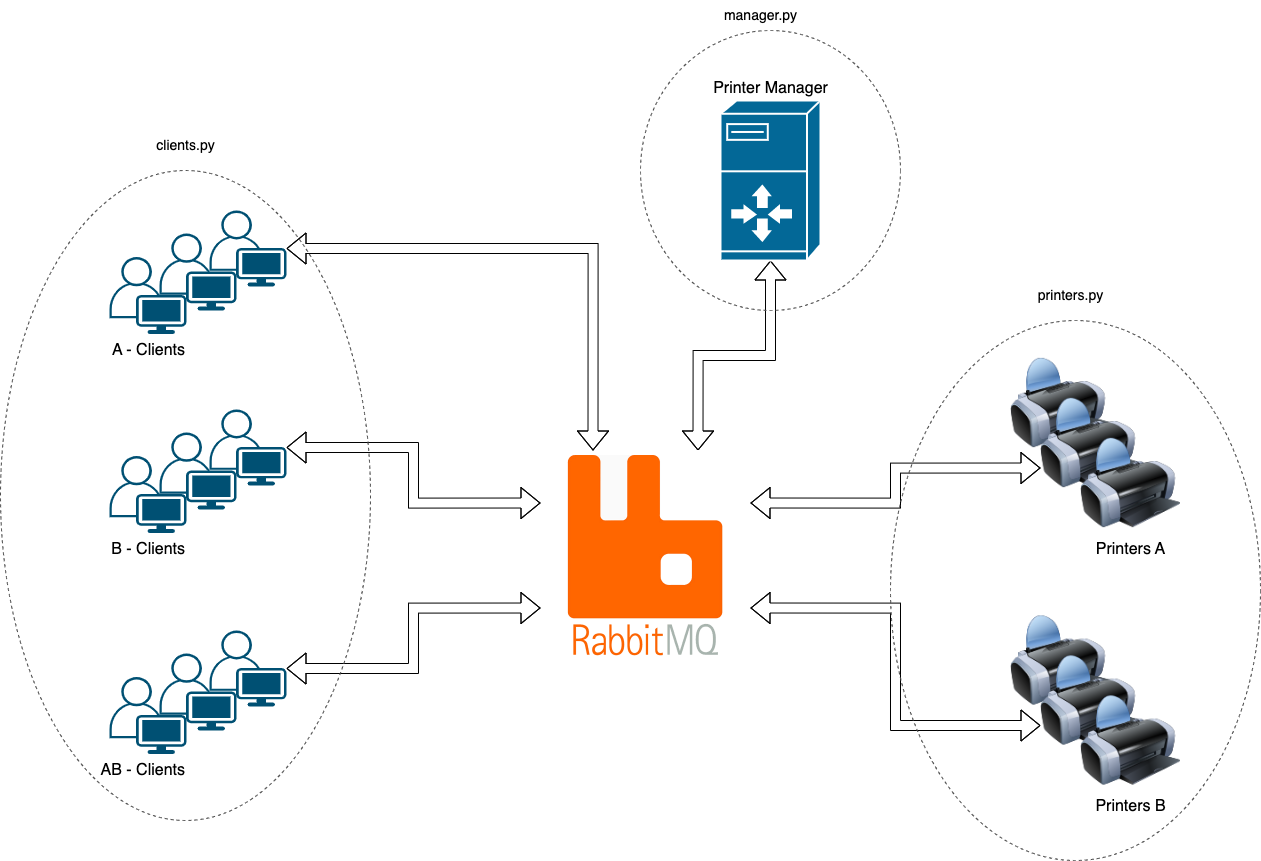
The managing server is responsible to get printing requests from the clients and for the dispatching of these requests to the corresponding (ready) printers.
The printers (in this lab, multiple printers of a type can exist) only communicate via message broker. No direct communication with the clients or the manager server is allowed
Imagine a scenario like this:
- The printers are all located in a data center in Lausanne
- The printer managing server is an application that runs in a cloud at Zurich
- All the clients work from home (remote)
For this reason, the system consists of four independent scripts/components:
- One Python script which simulates the printers
- One Python script simulating the customers
- One Python script simulating the managing server
- RabbitMQ Broker for all communication
Mode of operation
A client needing a printer sends a request (via message broker) to the printer manager, who returns an identification of the next possible available printer to the client. With this identification, the client can send (via the message broker) the data to this printer.
The client “prints” its file (line by line at a time) to the printer by pushing each line to the communication channel (on RabbitMQ) previously obtained from the print manager. The printers doesn’t send any ack or status messages back.
The client sends a message to the printer manager once the printing is completed in order to release the previously allocated printer.
The client waits a randomly time before attempting to print the next file or terminate its process if all files are printed
Printers behavior
The printers listen to the message broker, which suddenly gives them a new line to print. Simulate the printing time with a small nap time (~15ms or so). The reason for this is to be as close as possible to a real-world scenario (imagine that we are using old line printers). The printer gives no feedback once a line is printed (fire and forget).
Printer manager behavior
The manager waits for requests from the clients, processes them (sends a free printer ID/channel or put it in a waiting queue). The manager must be able to exit cleanly at the end of the simulation once all clients finished (→ the script that manages the clients sends a specific message to the managing server. This message will be used to stop the printer script (also sending an EXIT signal) and finally the managing server). All created queues and exchanges must be deleted at the end of the simulation!
Message broker
The message broker, an instance of RabbitMQ, runs the AMQP that you have to use. Here are the specs of the broker:
| Spec | Value |
|---|---|
| URL | concurp1.isc.heia-fr.ch |
| Port | 5072 |
| Username | guest |
| Password | guest |
Of course, you are free to use your own broker for the development process. The configuration about the broker will be written in the global .ini file.
Invoking of the simulation
Your simulation will be invoked in a Python3 (3.11 or higher) environment. As different Python scripts run independently, we have one general configuration file that describe all the parameters of the simulation.
Config file
Use the Python Configuration file parser ConfigParser for this task, it is a built-in library for this purpose.
The configuration file has the following structure:
    [broker]
    host = concurp1.isc.heia-fr.ch
    port = 5072
    user = guest
    pw = guest

    [printers]
    nbprintera = 1      # the number of available type A printers, int >= 1
    nbprinterb = 1      # the number of available type B printers, int >= 1

    [clients]
    nbclienta = 9       # the number of clients that must use printer A, int >= 0
    nbclientb = 7       # the number of clients that must use printer B, int >= 0
    nbclientab = 13     # the number of clients that can use both printer types, int >= 0

    [files]
    nbfiles = 11        # the maximum number of files that a client will print, int >= 1
                        # A client randomly picks a number between 1 and `nb_files` (inclusive),
                        # which will be the number of files that a client will print
    nblines = 13        # the maximum number of "lines" a file has, int >= 1
                        # For each file, a client selects a number randomly between 1 and `nb_lines` (inclusive)
                        # to send to the printer for printing
Invocation examples
To invocate the entire simulation, all elements must be started. It is a good idea to ensure that the RabbitMQ broker is running as first instance.
# broker is already running
# config.ini file is edited

# the following 3 launch will be done in 3 different terminals/docker containers/hosts/...
python3 printers.py
python3 server.py
python3 clients.py
Important
You must use the given script names!
The output of the printer
The printer’s output (file names and the content of the files) must comply with the following specifications.
The printer’s output content
Output lines from the clients look like this:
Client_<client type> #<client No>, <timestamp>, file <file No>, line <line No>
Please us for the timestamp the format Hour:Minute:Second:Microseconds (e.g.: 11:32:20:760369)
Example
Client_AB #1, 11:32:20:760369, file 3, line 20
Client_AB #1, 11:32:20:760394, file 3, line 21
Client_AB #1, 11:32:20:760419, file 3, line 22
You are free to add additional information.
The printer’s output file name convention
Each printer “prints” the data to its own file. The output filenames for the printers must look like this:
printer<type>-<ID>.txt
Where the type is ‘A’ or ‘B’, and the ID is an integer corresponding to number of the printer’s number.
Examples
The example output shows a setup that has 3 type A printers and 2 type B printers:
printerA-1.txtprinterA-2.txtprinterA-3.txtprinterB-1.txtprinterB-2.txt
Important
You must be compliant to these naming convention!
These files must be printed to the printer_out/ directory (you must not use absolute filenames). The directory is already created in your git repo.
Implementation steps
I recommend you to go through 3 steps of development:
- Setup a local RabbitMQ environment (e.g. in a docker/VM/host). You can add your
Dockerfile/docker-compose.yamlto your GIT repo if you wish. Have a look here for the official docker repo. - Develop and test your simulation on your local RabbitMQ environment
- Test on the RabbitMQ environment made available at school (concurp1.isc.heia-fr.ch).
Additional specifications
- The simulation runs without interactive input. It gets started and runs through until all clients finished their printing jobs. The simulation must end correctly!
- Mix-up the start of your client processes by adding a small (some microseconds) nap time to all of them
- Printed lines of different clients (using the same printer) must not be interleaved!
- The entire file of a client must be printed on the same printer. Printers can be changed between different file prints.
- The usage of available printers must be as efficient as possible (e.g. if only AB clients exists, all the printers (A and B) must be used as balanced as possible)
- All exchange’s and queue’s names that you create on
concurp1.isc.heia-fr.chmust be prefixed with your username (e.g. michael.mader-printerA-exchange) - All exchanges and queues must be erased on the RabbitMQ server once the simulation ends (e.g. exclusive queues)
- Do a proper thread-safe logging
- Describe in your code and/or commits why you chose one or the other technique of message broker’s exchange (default vs. fanout vs. direct vs. topic)
Submission and deadline
The code must be committed to the main branch of your group git repository. The professor will not search for more recent versions in other branches.
Running environment
Your code will be tested in a python:3.11 Docker containers. Indicate in the README.md file, if additional packages must be installed (give the requirements.txt or the poetry information).
Commit and comments
Your comments in the code and your comments in the commits forms your report! So the expectation is that these comments are self-explanatory and in-depth. Commit often and describe precisely what your were doing, what you tested, what were the bugs.
10 coding commandments
Don’t forget the coding commandments. The grading will also be based quite strongly on this. Here again the link 10 coding commandments
Teams of Two and Deadline
The last commit that is accepts should be done on 27.03.
Teams of Two
- Groupe 01 / lab20-a (remi.carrard, julien.gumy)
- Groupe 02 / lab20-b (bastien.bussard, luc.vogt)
- Groupe 03 / lab20-c (rodrigo.carracor, mailys.heimgart)
- Groupe 04 / lab20-d (noe.henchoz, orell.wandji)
- Groupe 05 / lab20-e (bertrand.marmy, yoan.gilliand)
- Groupe 06 / lab20-f (matteo.membrez, elvin.kuci)
- Groupe 07 / lab20-g (axel.buro, tom.yerly)
- Groupe 08 / lab20-h (simon.losey, elioamen.thalmann)
- Groupe 09 / lab20-i (danilo.anzile, robin.golliard, ismael.castella)