Lab21 - Translation pipe
Lab21 : Language translation pipe in Python
We want to write a small Python script that can be used in a normal shell pipe (|), like this:
fortune | python translator.py | less
This script should translate all words (one by one) from one language to another. To achieve this goal, a RPC call can be done to translate each word from one language to another. The RPC is made with the message broker (RabbitMQ) as we have seen it in the lecture.
- the translation will be done through RPC calls
- all words must be sent individually via RPC (i.e. one RPC call per word)
- all words will be translate to lowercase and thus, the result will be also lowercase
- punctuation will be filtered out during the RPC call, you must treat them in your application accordingly
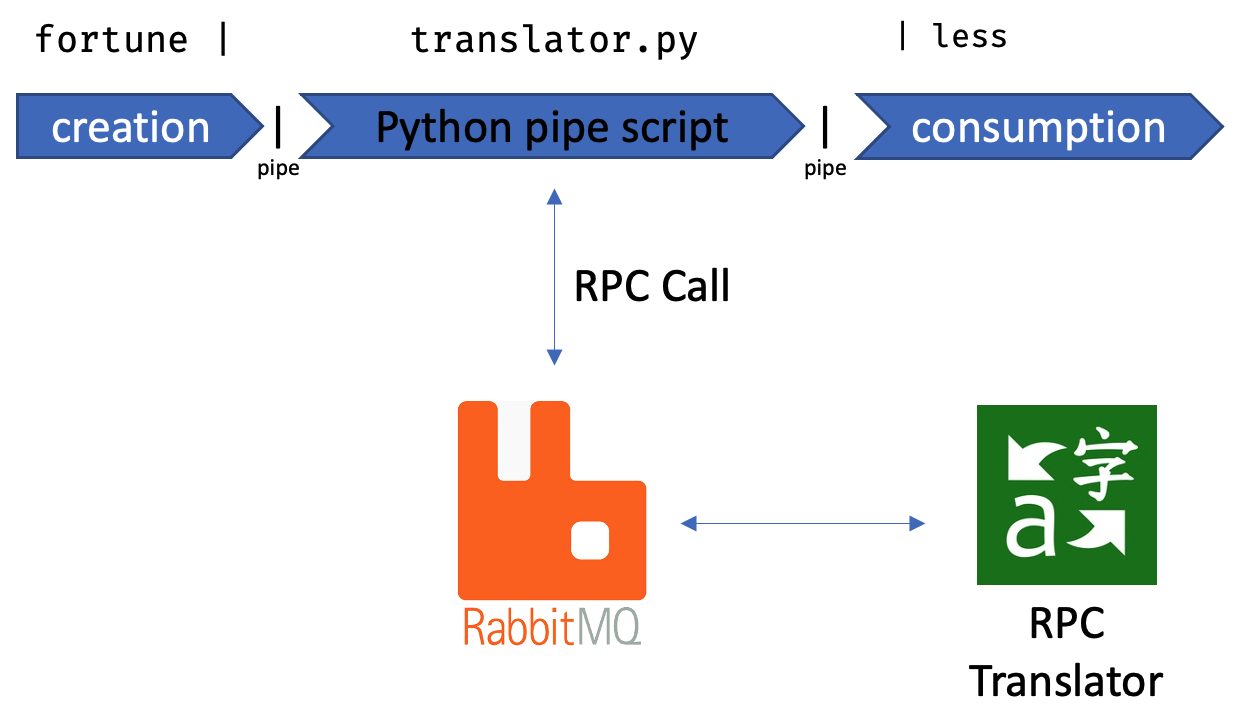
Message broker
The message broker, an instance of RabbitMQ, runs the AMQP that you have to use. Here are the specs of the broker:
| Spec | Value |
|---|---|
| URL | concurp1.isc.heia-fr.ch |
| Port | 5072 |
| Username | guest |
| Password | guest |
The RPC server
The server, which is servicing the RPC calls, can have multiple instances running and waiting for jobs to do. Thus, different calls can be serviced by different instances. All words that have been translated will be cached centrally on the servers and will be translated at the next time a lot faster. On the other hand, words that have never been translated since now, will be translated by an external translation service. This entire process (taking from cache or asking the external service) is transparent for you, but has one major impact: The time that a word translation takes can vary from very quick (some ms, out of the cache) to noticeable longer (around 1 sec).
This finally can have an impact of the message order if you would send multiple RPC in parallel.
The RPC service has the following properties:
| Spec | Value |
|---|---|
| routing_key | concurp-lab21 |
The RPC (string) message
In Python RPC with Python we have seen that all messages are strings. So the message sent to the RPC (via RabbitMQ) must be in form of a string. This string contains the necessary arguments to provide the result → the desired translation.
Each call to the translator RPC must have exactly 4 arguments that are joined together in the string and separated by a
column :
The arguments are:
- msg id
- source language
- destination language
- word to translate
Any call to the RPC that doesn’t satisfy the give format will return an error message as result: ERROR: your arguments ...
The result again, will come in form of a byte-code string, containing the msg_id and the translated word. These two information are also separated with a column : .
Example
The following example (pseudo implementation) would ask the service to translate the word flower from English to French. The message will be identified by the message id, which is 1234
query = "1234:en:fr:flower"
rpc_call(query)
The result will be then: "1234:fleur"
Languages
The following shows the languages that can be used as source and/or destination:
| Language | ID to use in the RPC call |
|---|---|
| english | en |
| deutsch | de |
| french | fr |
| spanish | es |
| italian | it |
The Python pipe-capable script
Finally, your Python script (Python3) that you write must be capable to get its input from the pipe and its output must also be pipeable.
We want to use it like this
cat mytextfile.txt | python translator.py | less
So, the input comes from the pipe (std_in) and the output will be put to std_out.
The script arguments
Your script can have two (optional) arguments,
which selects from which language (-f) to which other language (-t) the words will be translated.
The arguments must follow the language code seen in the Language chapter just before. The following default languages are selected if one or the other argument is missing:
- Missing
-f: default input language will be English - Missing
-t: default output language will be French
How to build a pipeable Python script
To have a pipeable script in Python, the std_in and std_out must be used. Have a look at this example code that just
echoes the input all in uppercase:
import sys

for line in sys.stdin:
    # sys.stderr.write("DEBUG: got line " + line)
    line = line.upper()
    sys.stdout.write(line)
Invocation examples
cat README.txt | python3 translator.py | less
Important
All arguments are optional. The translation script file is called translator.py
You must use this name!
Here are some example invocations:
# default arguments (input language is english, output language is French)
cat README.txt | python3 translator.py | less

# default arguments (input language is english, output language is French)
# output will be written directly to the shell
cat README.txt | python3 translator.py

# default arguments for input (english), output language will be German
cat README.txt | python3 translator.py -t de | less

# the input language is French, output language will be Spanish
cat README.txt | python3 translator.py -f fr -t es | less

# the input language is Italian, output language is default (French)
cat README.txt | python3 translator.py -f it | less

# the input language is English, input is taken from the interactive shell, output language is Spanish
python3 translator.py -t es > out_es.txt
Important
The script’s execution for the test battery will be done directly in the src/ directory.
All imports from additional files, which are in the same directory, must be done without directory prefixes
(e.g. import rabbit_connection )
Additional specifications
- If you want to print additional information for logging or debugging, use the
std_errfor that - The connection and usage of the RPC channel should be done as seen in the lecture
- Test your script not only with one single words, but inject also a text with multiple words
Submission and deadline
The code must be committed to the main branch of your group git repository. The teacher will not search for more recent versions in other branches.
Commit and comments
Your comments in the code and your comments in the commits forms your report! So the expectation is that these comments are self-explanatory and in-depth. Commit often and describe precisely what your were doing.
10 coding commandments
Don’t forget the coding commandments. The grading will also be based quite strongly on this. Here again the link 10 coding commandments
Teams of Two and Deadline
The last commit that is accepts should be done on Sunday, 03.05.2026
Teams of Two
- Groupe 01 / lab21-a (elvin.kuci, remi.carrard, simon.losey)
- Groupe 02 / lab21-b (elioamen.thalmann, axel.buro)
- Groupe 03 / lab21-c (mailys.heimgart, danilo.anzile)
- Groupe 04 / lab21-d (yoan.gilliand, robin.golliard)
- Groupe 05 / lab21-e (julien.gumy, ismael.castella)
- Groupe 06 / lab21-f (matteo.membrez, bastien.bussard)
- Groupe 07 / lab21-g (bertrand.marmy, luc.vogt)
- Groupe 08 / lab21-h (tom.yerly, rodrigo.carracor)
- Groupe 09 / lab21-i (orell.wandji, noe.henchoz)